Skills, plugins and connectors: what they add to your AI chat
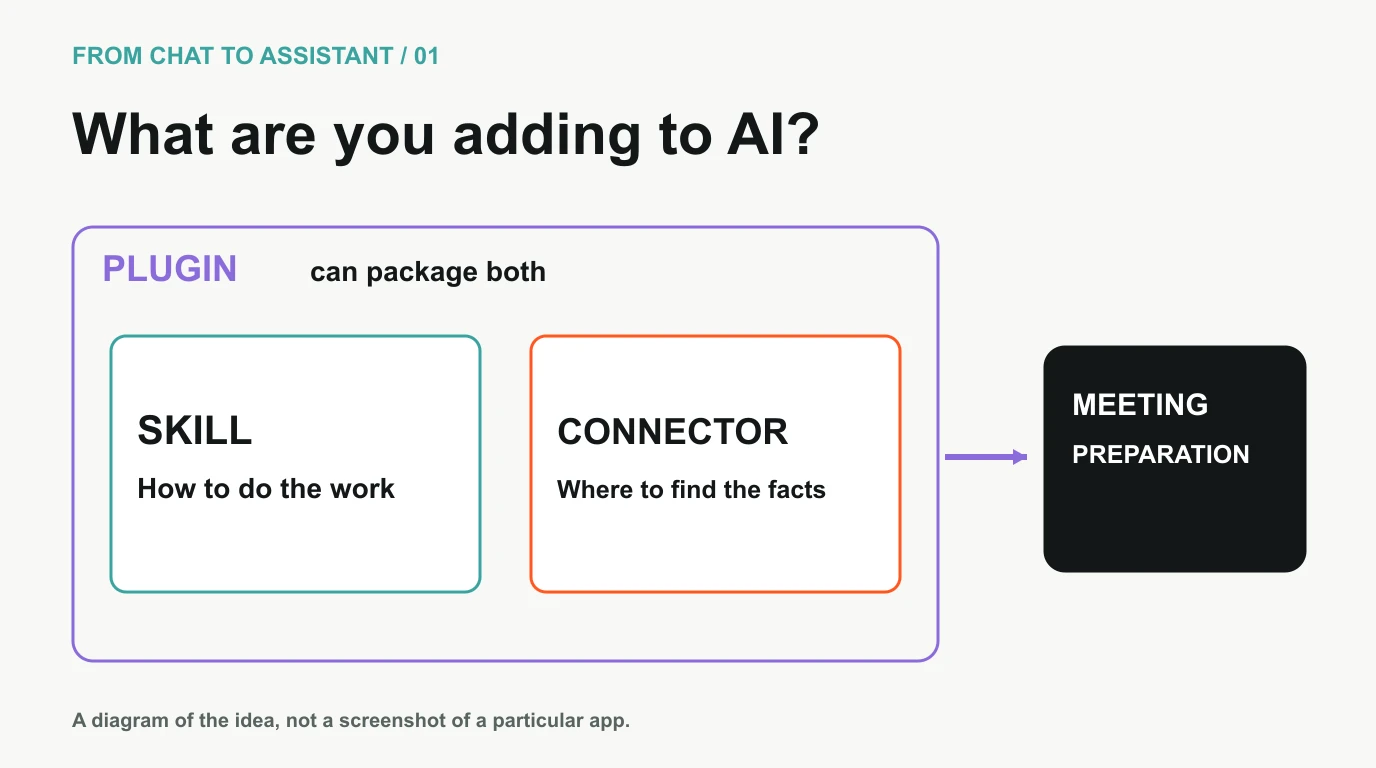
A skill defines the workflow, a connector provides access to information, and a plugin can package both. The differences, explained through one meeting-preparation example.
From chat to assistant, part 1. Next: What is a coding agent, and how do you choose one? →
You have a meeting in half an hour. The invitation is in your calendar, the latest agreement is in your email, and somewhere in your notes is what you promised last time. You want one page from AI: who you are meeting, what needs resolving, and what not to forget.
You type “prepare me for the meeting.” AI asks who it is with. You give it a name. It asks for background information. You copy in an email. You get a long summary, even though you wanted five points. Next time, you explain much the same thing again.
This is where skills, connectors and plugins start to make sense. They are not three names for the same thing. And you do not have to start programming to use them.
A skill: how the work should be done
A skill is a reusable workflow for a particular job. It can tell AI when to use it, what to find out first, which order to follow, and what the result should look like. It may include templates, supporting material or helper scripts. It does not have to be just one sentence. [1]
For our meeting, the workflow might look like this:
First, confirm which meeting I am preparing for. If that is unclear, ask. Use the supplied or available material to produce a short brief: the meeting’s goal, the last agreement, open tasks, and three questions requiring a decision. Cite the source for any specific agreement. Mark anything you do not know as missing information. Do not send or confirm anything on my behalf.
That is the content of a workflow, not installation instructions for a particular application. It could become a skill you reuse next time.
You normally write an instruction for a single answer in a message: a prompt. A skill lets you save a workflow and use it repeatedly. In some applications you choose it yourself; in others, AI can suggest or load it based on your request and the skill’s description. [1]
This does not necessarily retrain the model or automatically give it access to your account. It gives it instructions for doing the work. Whether it has the necessary information is a separate question.
A connector: where the information comes from
A skill might say “find the latest agreement in my email.” Without access to your email, it cannot do that.
A connector links an AI application to another service or data source. For our meeting, that could mean your calendar and email. The particular connection determines what AI can retrieve or what other actions are available. MCP is one way of making such a connection. We do not need its technical details here. [2]
The difference becomes clear when you try the same job. Without a connection, you supply the invitation and correspondence manually. With a suitable connection, AI can search the available material through its tools. The connection itself does not tell it what matters for your preparation or how to arrange the result. That is what our workflow describes.
If you need to summarize one document once, you may not want a connector at all. Just attach it. A connection becomes useful when you repeatedly look for the same kinds of information.
A plugin: what you add as a package
A plugin extends an application. Depending on the system, it can provide skills, connections to services, or a combination.
Imagine a meeting-preparation package. It could contain the preparation workflow, a template for the resulting brief, and a calendar connection. This is not a claim that this particular plugin is available to you now. It is an example of what can be packaged together.
Current OpenAI documentation describes skills as a way to build reusable workflows, and plugins as packages for distributing skills and connectors. A plugin does not have to contain everything at once. [1]
The names and boundaries vary between applications. When choosing an extension, look at what it actually adds: a workflow, access to information, new actions, or some combination. The word “plugin” alone does not tell you.
What changes for our meeting?
You can start very simply: put the background material into the chat and add your preparation workflow. You are not connecting anything yet.
A good result for our example should separate the last documented agreement from proposed follow-up questions. If the material contains no deadline, AI should not fill one in because it sounds plausible. It should say it could not find one. You can check that. With a general “prepare me,” it is often unclear what you expected in the first place.
Once the workflow suits your work, you can save it as a skill in an application that supports it. Add a connector if manually supplying the information starts slowing you down. A plugin can be a way to obtain or share that setup as a ready-made package.
Even a saved workflow does not guarantee a correct answer. The brief can follow the structure beautifully while misunderstanding a commitment. That is why our example asks for the source of the agreement, and why we actually check it.
You do not need ten extensions for your first attempt. Choose one job you keep explaining to AI. Write down what information it needs, how it should proceed, and how you will recognize a useful result. That will show you whether you need a better request, a repeatable workflow, or access to the right material.
Sources
Checked against official OpenAI documentation on 17 November 2026. The meeting is an illustrative example, not a recommendation for a particular commercial extension.
[1] Build skills, ChatGPT Learn. Skill structure, supporting resources and scripts, invocation, and distribution through plugins.
[2] Model Context Protocol, ChatGPT Learn. Connecting to tools and information from other systems; plugins can package connections and skills.